Wednesday, August 07, 2013

Wednesday Writing - Writer's Notebooks

First day of school. After a night of tossing and turning I wake up with butterflies in my stomach. Yes! Even after 23 years, I still get them. I enter my classroom and flick on the lights. It is quiet now but the room has a certain tension this morning. An air of expectation. The pencils are all sharpened, the chairs are all pushed in, and the floor is clean. I take a deep breath and glance at the clock. It's 7:15. I have another 20 minutes before the bell will ring and those eager little bodies will bounce down the bus steps and stream in the front doors. 20 minutes to make sure I have everything in place and go through my mantra, "I may be as prepared as possible, but never prepared enough for reality. I must trust in my ability to handle all things as they come. Today I will make a difference. Today I am a teacher."

I am ready.

We will be setting up our Writer's notebooks this morning. Another composition book to put in their desk. I want thing one to be special to them. So I'll let them decorate to their heart's content and then go home tonight with homework to gather more things to decorate it with. Then tomorrow I will mod podge everyone's covers so they stay perfect. I got the idea from one of the bloggers I follow and I am truly sad that I can't remember who the genius was. If I figure it out, I will definitely update here.

But for today, we are going to fold down the first two pages of our notebook to act as the Table of Contents. In the past I have held off having them write things here. I would save it as a busy work task during the long week before holiday break. But they do it only halfway, or not at all. So I am rethinking this part. I am going to have them get into the routine of updating their table of contents every few days. Next, we'll separate our notebook into four sections. I am going to have them glue ribbons into each section so we can find them throughout the year. Our county is asking that we allow them to write in all four genres this year instead of just concentrating on two. They believe the more exposure they get, the better retention.  And later the more skilled writers we'll produce. Hmm. There will be a ribbon for Personal Experience (Narrative), Information, Persuasive, and Fantasy. We'll really have to think about which genre to put our pieces in. If we are doing some poetry, are you writing about the weather? Then should it go it personal experience (A Day in the Rain), Information (Cloudless Skies), or Fantasy (The Rainmaker)? Fun, right?

This year I am having them put all of their planning and drafting into this notebook. Once they get ready to move it to the final draft, I'll have them use a legal pad. This move into a different paper is going to make them understand the difference between drafting and final copy. We'll talk about the importance of best handwriting and pay attention to correct punctuation. Always a struggle for us. Maybe the move to a different format will turn their brains into a higher gear. I can hope, right?


Monday, August 05, 2013

Monday Mentor - Setting up Notebook

Last week I showed you how I set up the student binders. Another thing we do at the beginning of the year is set up our Math Notebooks. Like a lot of you, we use the marbled composition notebooks for this purpose. The school provides us one for each student, so I can save a little money there.

The first thing I have them do is decorate the cover with ways they use numbers (photos, stickers, magazine ads, etc). This year I am going to follow the advice of Mrs. Hawk's Nest by hot gluing a ribbon into the back of their books so they can mark their place. So often they just flip to any old page and start working. I am WAY too OCD for that. I want the work to move chronologically through the book, so if I want to refer to something we've done in the past, I have them just open to that date.

I break the composition book into two sections. If you close the book and hold it up so you can see the top of all the pages, you'll notice a definite hole that marks the middle of the book. I have the students open to this page. We dog-ear (fold down) that page and make a chapter header for our 'Calendar' section. This is where they will complete all of their calendar activities during our Math block.

The front section is used for problem solving. I have them paste in a copy of the C.U.B.E.S. method that I found over at Elizabeth's site Fun in Room 4B. You can go to that link and grab your's for FREE!


I then print out a math exemplar related to the topic of study that week and have them go through the C.U.B.E.S. method to help them organize their thinking. You can actually purchase these exemplars by the set in my TpT store.


Just in case you were curious. 

It helps me to keep all of their work in one place for CRCT review future reference. Plus they can see the progression of their knowledge throughout the year. 

We have a section set aside in our binders for our interactive notes. They can flip through that to help them support their explanations when writing about their solutions. 

Leave me a comment below and let me know how you use your math notebooks!

Saturday, August 03, 2013

Tried It Tuesday - Washi Tape

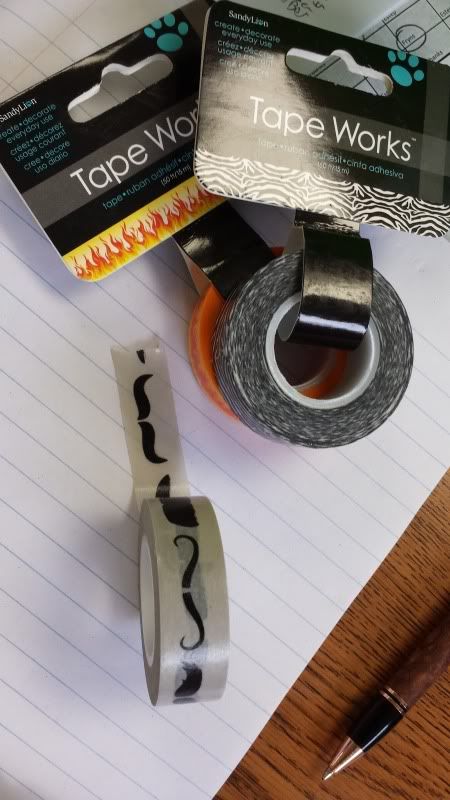
Have you heard of this stuff? Everywhere I turn I am hearing about how awesome this stuff is. I had no clue what it was, so I went to the Shopping Queen, aka Jessica Ivey, and asked. Of course she had an answer. Washi tape is just this super fun tape with designs on them. There are several different brands such as the ones I got called Tape Works, but they all accomplish the same thing.

I picked up three types today.


The Mustache one, A fire brand, and a zebra pattern. They were like $3 each, but you can't put a cost on fun.

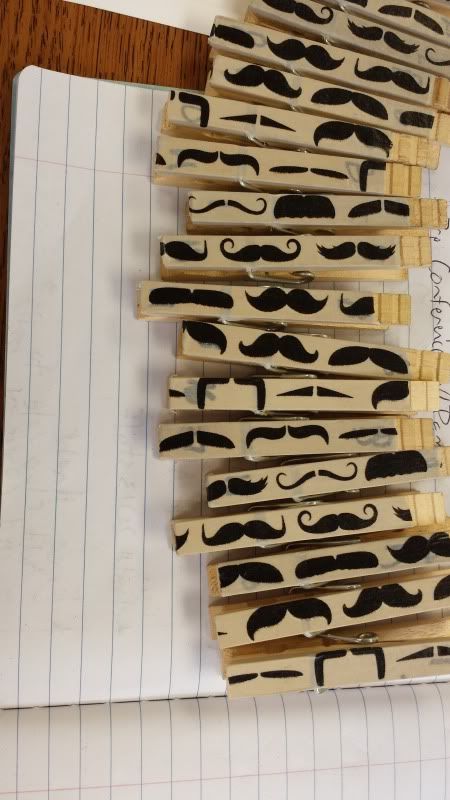
I am using the Mustache tape to put on the backs of my behavior clips. This is only so that I can say, "I MUSTACHE you to behave." Get it?


Bethany Hunter must have read my mind because she sent two MORE types of tape. Win!

Catch up - Meet Your Teacher Day

All through yesterday I kept thinking of your encouragement and belief that the day would go well.

Thank you thank you thank you for all the good thoughts. Yesterday was probably the easiest Meet Your Teacher Day in 22 years. Since the county has moved onto having the parents complete all the paperwork online the teacher's job on this day has become almost a breeze. Before we would spend the entire four hour period scrambling around collecting papers, checking medical files, signing forms, and counting money. Yesterday I spent more time hugging on parents and chatting with the students about their summer than I ever have before.

I am recycling four families this year, so that probably helped me be comfortable meeting the parents. They loved looking at all the class pictures I had lined up above my bulletin board. I have a nephew of a student I taught in third grade. He is now a junior in college. Yep, I feel old. But we laughed over the pictures. It was great fun.

I'm already thinking this year is going to be awesome. Sure I will have my challenges. I am actually okay with this because if there aren't any problems to keep me on my toes I can grow a little bored. Lord knows I don't want to be bored at work.

Just wanted to catch you up and let you know that yesterday went very well. Thanks again!

Friday, August 02, 2013

Friday Fun - Linky - Remembering Names


{Grab this button by right clicking and choosing "Save Image As" to add to your blog post}

Today is the day. I get to meet all my brand new fledgling fourth graders. I am so happy that our county has gone to an online registration system. This completely frees up this day to actually chat with my students and their parents. I don't have to rush around checking paperwork, collecting forms, and handing out money orders. It is such a more relaxed session than it was in the past.

My room is pretty much ready and I am already lining up stuff I need to print out for the first day of school. Shh, but I already have names on forms and stuff and I haven't even met them yet! There's always a chance that someone has moved over the summer. For some reason I always get ahead of myself and end up redoing a bunch of stuff. That's okay, right?


There are 27 students on my list and I have some interesting names to remember this year. As I was typing the list up three ways to Sunday, I was already practicing who would come next. It was  kinda hard this early. I need to see them to really get a handle on who they are. It usually takes me a week of interacting with them to really get all of their names down. What helps is that I greet them at the door every morning with a choice:
Do you want:
A. A Five High
B. A Firm Handshake
C. A Finger Jazz
D. A Fist Bump

Most of them go for a high five (I had to change the name up a bit to fit with the other choices), but after doing this a while they start getting creative. I had one teach me several different cool handshakes last year. It's a great way to see who is shy, who are the more boisterous ones, and which ones might need some work on the social interactions. 

Each morning I try to greet them by name and ask them something about themselves. It doesn't always get great responses at first, but they eventually come out of their shell. Some of them a little too quickly, if you know what I mean.

What are some ways that help you to remember their names in the first week? Add your post links below, I'd love to read them!


Thursday, August 01, 2013

Currently - Oh' Boy August

Fun Linky! Fun Linky!

Farley over at Oh' Boy Fourth Grade is throwing this party together. Go there to grab your chance to link up!


Listening: Frozen, by Madonna. Well, now it's Georgia Rose by Queen Latifah. Just my 'Jazzy' playlist while I work at playing blog catch up. NO tv on during this time, or I will zone out and forget what I was doing. Then it will take all night to catch up. 
 
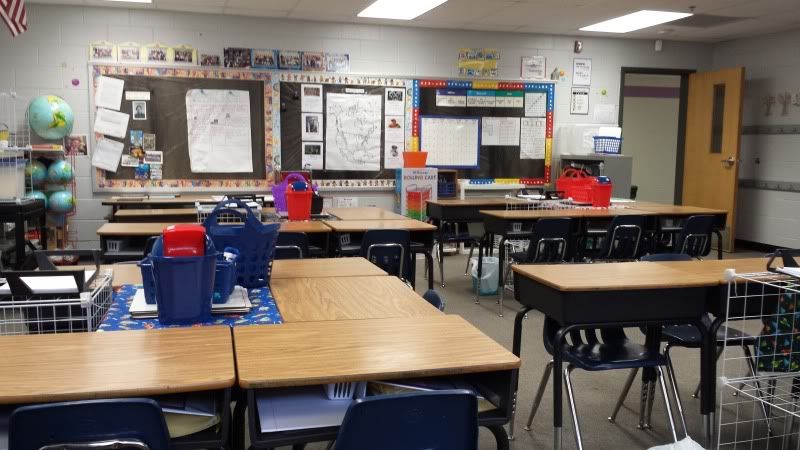
Loving: All that time I spent getting my classroom put together after moving into a room with windows AND a bathroom, has paid off. I wasn't stressing (too much) this week getting back into the swing of things. I even had time to think about lesson plans for the first day. Ha!

Thinking: Urp, it kinda messed up my workout today. I was going along just fine but then started feeling the acid from the spicy sandwich creep up on me. It is not pretty to jump up and down at such a time.
 
Wanting: I've been eating so bad as school gets closer. Trying to grab onto the idea of freedom. Must stop this now! It's back to Greek yogurt and lean ground turkey for me...starting tomorrow. For now, that blizzard is calling me NAME!
 
Needing: Okay, I went and got the water to curb my appetite. Sitting here sipping away while I finish up my blog work. I wanted to put up a new product in my TpT store. Something simple, but I can't decide on what just yet. 
sip sip
 
B2S Must Haves:  That bleeping pencil sharpener continues to elude me. After all the blog contests I've entered and the begging and pleading to get people to follow me on blogloving so I can reach the 100 quota to 'review' one for the company just isn't happening.
I went through my class library and noticed the sad state of my Native American bucket. In Fourth we teach all about six different tribes. I ordered a couple of great books from Amazon and got an email today that they have shipped. Yay!
Sanity. Meet the Teacher is tomorrow and reality will set in. Let's not have any breakdowns, or trying to open the window so I can escape and go fishing this year, k?

Thursday Tutorial - Securing docs on Microsoft Word

My super newest friend has got to be Jessica Ivey, which I'm sure y'all know her better by Jivey. If you don't, she's cool. You'll like her.

Enough sucking up to my work colleague, let's get to the point of what this post is going to be about. I mentioned Jessica because in her uber-helpful section called Techy Tips she put out a post on how to secure your TpT products using pdf files. It's simple and straight forward, but something you definitely need to be careful with. If you are using other TpT sellers' products such as clipart or backgrounds, you need to check out that post. Most folks are stressing that you must 'secure' your materials if you are using their products. I will definitely be using Jessica's tips from here on out.

The big problem then is how to secure it so that folks can't just right click on an image such as those super cute super hero kids from Creative Clips and use them in Evil Pirate Ways. I don't want that to happen at all. I know how much hard work is put into these products, and to provide a way for some to take them without asking would make me feel horrible. 

As I was creating my new Common Core product for teachers to display which standard they are working on, I started wondering if there was a way to secure documents in Microsoft Word. Lo' and behold, there is. 

I found the answer on eHow. This is going to show you how to create a 'read only' file so folks will only be able to view and print out your document and not be able to click or alter anything you've included. I'm going to elaborate on that (read as 'with pictures') to share what I learned. Their process to secure Microsoft Word documents seems pretty easy, which I am thankful for. So let's get started.

1. Open the document you've created in Microsoft Word that you want to secure.

2. Click on the big Microsoft Office button.

 And choose the 'Prepare' option right under Print. 

3. Out of the options you have there is 'Mark as Final'. It will prevent users from editing the file, as they will only be able to view and print it.


Hopefully this will thwart all of the Evil Piracy Lords and Ladies out there and will protect the amazing work on my fellow TpT sellers.

**Hindsight:
I sent Jessica a file made with this trick and sadly, she was still able to get into it after a simple click.

When you open it a window pops up that announces, "The author has locked this to discourage editing, are you sure you want to enable editing?"

Click... and she was in.

GRRR!

Back to the drawing board.


Wednesday, July 31, 2013

Back to School Goals 2013

Hi again. It's me. After my first full day of work school. It went pretty well with only a few down moments during those long coma inducing meetings. by the way. I had a few moments to check my Blogloving and saw that Jess over at I {heart} Recess had a really fun Linky going on.

Had to jump in and get the positive juices flowing again.


Personal: I have been saving up since January to make that huge airplane trip to Australia! I'm so excited, but a little anxious as well. I've never been there or spent that long in an airplane. I can't sleep on board, so that should get a little interesting.
 
Organization: One of my colleagues, Laurie, went above and beyond to find me this really cool rolling cart with ten drawers. It was only $25 at Sam's Club and they didn't have them at her regular one, so she went out of her way to try another one and was successful! Now I have the perfect organizer for my Reading and Math groups. 
 
Planning: I became obsessed with TpT this summer. I can spend all day making stuff to put up for others to enjoy. Now that school is back, that is totally going to cut into my TpT time. What am I to do?

Professional: I have so many resources that I buy after taking a staff development or someone mentions how great it is. Then I am so bad at looking through them. I stick them into a file cabinet and forget them. I want to drag a few out and see what's between the covers. 

Students: Speaking of, I attended a great session during out county's Summer Literacy Institute that discussed having Academic Conversations on a much deeper level. I am committing myself to making this work in my room this year. 

Motto:  I found this quote and made a poster of it last year. The rest of it says, "Wrong is wrong even if everyone is doing it." I tell my students this all the time when they are all chatting away during a fire drill.

Thanks, Jess. This was fun!


Writing Wednesday - Writing Conferences

Going through all of my teaching guides (something I should do more often) I came across Carl Anderson's How's It Going? This is definitely one of those books that cemented my teaching style. I love helping students with their writing. Listening to their voice come through and building on their skill set to push them even further is so amazing. Children have unique stories to share and Anderson's book is perfect to help you understand the ideas behind the writing process.


Poking through this book I thought it would be a great idea to develop a product for my TpT store for writing conferences. A writing conference is a once a week meeting with each student about their writing that lasts  maybe 5-7 minutes. The teacher's role in this is two fold. They need to listen to what is driving the student's intentions for that piece on that day. Then they need to pick one point to guide the students in developing their writing ability.

One of the things you need to do with this conferencing is to keep a record of what you talk with each child about. These notes come back into play the next time you meet. They act as a record to see how the child is progressing during the writing block. I have one of the record sheets that I use in my class to show you today.


You can grab this here

In the TpT product I want to include a bunch of different types of record sheets, tips and strategies for the teachers, some posters for your room, and student notebook cards that will remind them what to work on.

Can you think of anything else I might need, or you'd like to see included in this pack? Leave me a comment below and I will be sure to add it to the list. Thanks for your help!

Monday, July 29, 2013

Tried it Tuesday - Cake Pops

As part of my baking duties for my sister's wedding reception up in Maine I set aside some time to make cake pops with her 4 year old daughter. A. was such a big help dropping the balls into the frosting, eating the mistakes, and providing a running commentary the whole time. So I fulfilled my job of keeping her occupied for at least an hour. Yay me!

I made cake pops before using a kit that Jessica Ivey gave me for Christmas. It was a bit of trial using that method when the sticks didn't fit into the holder and I purchased larger sticks than I needed. Plus the shape coming out of the pan looked more like the planet Saturn than a round pop. I mean absolutely no disrespect to the Jivey and love love love my gift. But I wanted to try a different method.

I jumped on the internet and found this recipe from A Beautiful Mess and gave it a whirl. I used a strawberry cake mix and the leftover decorator icing that I added coloring to so I could pipe out some roses for the wedding cake I made. The only thing that I would change about the recipe I used was not to put in 2 CUPS of frosting. I barely used 1/2 cup to  make all the crumblies stick together.


Judging by how quickly these were gone after I put them out, I think they turned out okay. Well, A. certainly enjoyed them.

Back to School Giveaway Winners

Thanks for everyone who participated. It was so cool to see all the entries roll in on that little Rafflecopter readout!

Without further ado, here are the winners of the Back to School Giveaway:


Congratulations! Each of you will receive an email from me about what to do!

Mentor Mondays - School Binders

This will mark the turning point for my Mentor Monday posts. I am switching over entirely into school mode since I have to report for duty at 7:00 A.M. this Wednesday. To help you get ready as well, I am switching to more school related posts instead of blog set up.

For the first topic, I wanted to show you my school binders that my students will use to keep everything in this year. I tried this out for the first time last year and I really liked it. I went with a 1" binder for all the students and it went okay. The only part I didn't like was when I had to pull out the 'chapters' from the Social Studies and Science sections when we were done. Otherwise there wouldn't be any room to add more paper.

This year I am going with the 2" Front View Binder.


They'll put their Homework Agenda notebooks in the front followed by four tab dividers. One for Math, Language Arts, Science. and Social Studies. I provide them with the dividers and the little tabs to write the subjects on. This is a good introduction to how well the class can follow directions as they write the titles and insert the tabs.

I usually give them an Accelerated Reading Log to keep in the front of their Language Arts section. They record the books they read and how they did on their tests on the computer.


You can grab the 2 page PDF file here so that you can print them double sided from here

I am giving each of the students a cardstock 8.5x11 sheet to decorate as a cover for this binder. You'll remember it was part of my QR Code postings.


I also made a little Prezi slideshow attached to the QR Code to help parents with the layout, Binder Covers


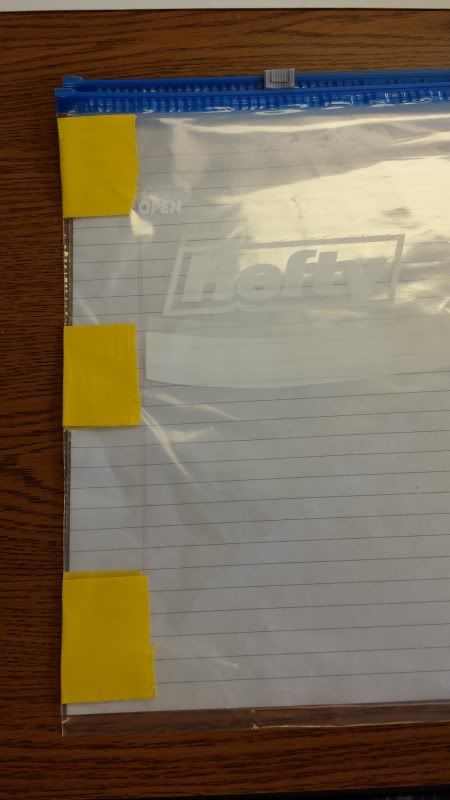
The final thing that I put into these binders is a gallon sized ziploc baggie that has been reinforced with duct tape and hole punched.


The students will keep homework papers, unfinished work, and works in progress in these packets. They could also slip in a book to read so that important materials won't get lost in between school and home. Now everything is in a neat package that fits inside their desks. They will also pick up some responsibility skills by making sure that this binder goes home every night and returns every morning.

I'm looking forward to this little bit of organization this year.

Sunday, July 28, 2013

Mentor Text - Social Studies


Those two FAB ladies over at Collaboration Cuties Stacia and Amanda are at it again with their latest installment of mentor texts.

This week's theme is Social Studies! They offered up a great text to include in the study of Native American tribes which fourth grade does every year. I definitely added that to my Amazon cart. Oh, definitely go over and grab the freebie. It's too awesome when you are starting up interactive notebooks. It will help students get ready for working with longer texts more independently.

For my installment, I want to share a book I was introduced to least year during our study of the American Revolution. It's called The Scarlet Stocking Spy by Trinka Noble. It's an incredibly moving tale of a young girl who helps craft a code with her soldier brother to pass information around about British ships in the harbor.


Here's Amazon's write up:
Philadelphia 1777 is no place for the faint of heart. The rumble of war with the British grows louder each day, and spies for and against the Patriots are everywhere. No one is above suspicion. Still, everyday life must go on and young Maddy Rose must help her mother, especially since her father's death at the Battle of Princeton and now with her beloved brother Jonathan off with Washington's army. But when childhood games become life-and-death actions, Maddy Rose is drawn ever deeper into events that will explode beyond her imagining. As young America stands on the very brink of its fight for freedom, it becomes clear that even the smallest of citizens can play the largest of parts, and that the role of a patriot has nothing to do with age and everything to do with heart. In The Scarlet Stockings Spy, Trinka Hakes Noble melds a suspenseful tale of devotion, sacrifice, and patriotism with the stark realities of our country's birth.Noted picture book author and illustrator Trinka Hakes Noble has pursued the study of children's book writing and illustrating in New York City at Parsons School of Design, the New School University, Caldecott medalist Uri Shulevitz's Greenwich Village Workshop, and New York University. She has authored and illustrated numerous books including the popular Jimmy's Boa series, which has been translated into six languages. Trinka lives in Berrnardsville, New Jersey. The Scarlet Stockings Spy is her first book with Sleeping Bear Press. Because Robert Papp's childhood drawings of his favorite superheros were such a pleasure, it was only natural that he would wind up an illustrator. Nowadays, his award-winning artwork appears on book covers and in magazines instead of on the refrigerator. He has produced hundreds of cover illustrations for major publishers across the United States. Robert lives in historic Bucks County, Pennsylvania.

I must give you full warning to be prepared for the ending. I wasn't expecting it and was shocked into stopping for a bit to catch my wits.  Just make sure that you read it through for yourself first.


Saturday, July 27, 2013

Student Motivators - Traffic cones

Joanne over at Head over Heels puts on this great linky party about motivating your students. She's got a great idea about how to engage students in complementing each other!

This fits in so perfectly with my theme for this year. I want them to pay more attention to what others are doing. This skill is going to help build that Common Core ideal of deeper thinking. Conversations are going to be different in my room this year as well. Instead of everyone just shouting out their connections to a book or a topic, they are going to practice listening to others and responding to their thoughts as well as incorporating their own.

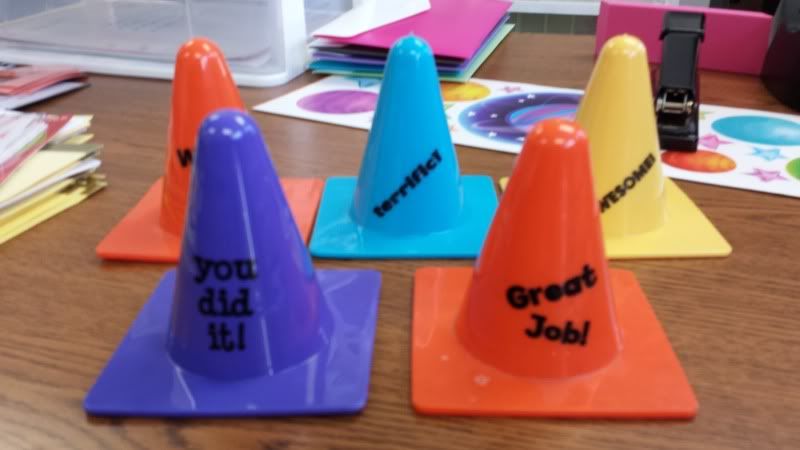
So for my student motivating idea to share, I have my student of the week be in charge of putting out these fun traffic cones with encouraging phrases on them. I get them at the Dollar Store.  As we are working on a lesson I might tap the student of the week to search for someone showing off exemplary skills and they would place the cone on that person's desk. The cones are turned in later for reward points. They like the attention and I get to reward those that are doing good more.

Yay!


Friday, July 26, 2013

Friday Fun - Last Summer Weekend Sale and Giveaways!


OoooOoooOhhh, it's here. The last Friday of Summer vacation. I saw this coming a long time ago, but was hoping it would get lost.

It didn't.

School begins for teachers next Wednesday. Even though we won't get paid for it, most of the staff will probably be in their rooms sometime on Monday and Tuesday as well. I know I will. I've got to put my huge beginning of the year pile together to send to the printer. Can't wait!

Since it's the last weekend right before my 23 year of teaching, I thought what other time than now to have my first sale in my TpT Store. So, rush right over there and grab all the things off of your wish list because the 20% Sale (they wouldn't let me type in 23) will end on Sunday, July 28th at midnight!!

 Now for an even better idea. How about winning some of those things on your wish list for FREE?

I've put together a little Giveaway to make up for the last 3% I couldn't tag onto my sale. This means there will be three prizes given away next Friday. Go ahead and enter as many times as you can below. Can't wait to see who the lucky winners are going to be for:


a Rafflecopter giveaway


The Winners are:
 

Thursday, July 25, 2013

First Teacher Casualty!

I've been slowly working through my room to get everything ready for ...wait for it...next week! My other friends (a.k.a. colleagues) have been making appearances as well. It's great to see them again that I'm almost excited about going back to school.

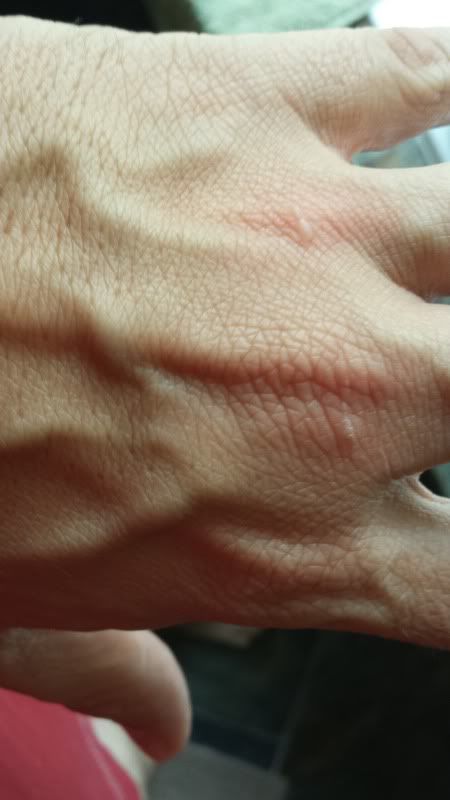
I was in there today getting my binders ready and putting a bunch of stuff up on the walls. I think I got a little too excited as I was using the hot glue.


So, as you gear up for 'Back to School' mode, I am warning you to remember to be careful as you wield your hot gun. Those suckers are hot.

Thursday Tutorial - Prezi

***HUGE DISCLAIMER: Prezi requires that your cell phone or tablet has Flash Player capabilities. Which apparently Android does NOT!! These presentations only work on iPhones and their tablets. Ug!


I often do things backwards. Like today's blog post, I am going back to the beginning of the Prezi tips and tutorials to find out how to set up an online presentation. This is after I struggled through creating my own for last week's QR code tutorial.

Prezi works off the same principals as Powerpoint. If you aren't familiar with that program, it is basically a slideshow that you can create that will run automatically through each slide or the viewer can click through using their keypad. You create each slide individually and add movements and even sounds and voice recordings if you like. Prezi is just a way to share it online.

What's really cool is that Prezi allows you to work simultaneously with others on the same slideshow. Think of the applications this could have for college students!

Once you sign in, there are actually tons of helpful videos that you can watch that help you get started on your presentation. There are a ton of 'metaphor' templates for you to choose from. Think about the information you are providing and then look over the templates to find one that matches it. Maybe your new blog creation was similar to climbing a mountain (I almost used the word 'like' in there. Big no no for metaphors). Choose your template and click on the slides over to the left to change the formatted information on each of the slides to match your own messages.


You can click anywhere on the original slide to add text and even place a youTube video using the controls at the top of the screen where it says 'insert.' Or you could bring over presentations you spent weeks creating in Powerpoint right into Prezi. Pretty cool.

You can add text boxes and remove others. You can change up the order of slides and make it your own. Moving the frames around on the template is as easy as clicking and holding then pulling it to where you want it to be. Adding images and new frames is done through the controls at the top under 'Frames and Arrows' and 'Insert' where you can maneuver through your files to find images you might have saved there.

Once you are ready to share with others, click on the 'Present Online' option and copy that link to give to others. I made the mistake of copying the URL from the 'Share' feature and it wouldn't let people in to see the slideshow. So both of my QR codes had to be redone. Bummer.

But it seems I wasn't too far off the mark for creating my own Prezi online presentation. I guess it was more self-explanatory than I thought. My biggest problem was that I couldn't figure out how to get down to each individual slide to add information. I kept clicking on the original slide, but it wouldn't come up. Then I realized I had to click on the separate slides over to the left to change the information.

I still have a few questions though.
*How can I copy and paste an entire frame?
*How do I make sure that the text, such as subtitle, are exactly the same size. They only had the bigger and smaller keys and you can pull out the frames to enlarge the text size, but who knows if you pull out every text size to the same?


If you are interested in joining Prezi, use this Referral Link and tell them ScrappyGuy sent ya!

Wednesday, July 24, 2013

Wednesday Writings - Travel Travails

I am finally home after the weirdest air travel vacation I've ever taken. I'm still trying to get over it all after losing almost two days to it, so I'm turning today's post into a bit of a vent. Bear with me.

It started right from the beginning of the trip. Last Wednesday, I was supposed to board a plane headed to Laguardia and catch a connection to Bangor, Maine then drive another four hours to the most northern city in the contiguous US. Sounds simple right? Mmm-hmm. No.

Driving into the airport you could see a huge black cloud with swirly edges just sitting right over the airport. Lovely. We bit our fingernails until they announced our boarding, hoping we'd get out tonight since we had reservations and such in all the other cities. They let us on the plane after delaying it almost an hour and a half. Then we proceed to sit at the gate for another two hours just waiting for the little storm to pass. It doesn't. Just when I should just take a nap, they come back on the intercom to apologize. Since we've been sitting so long, the pilots had timed out for the day and we would need to deplane for them to decide what to do next.

OY!

We've already missed our Bangor connection (which we discover was cancelled anyway), so we decide to just drive back home and try again in the morning. We rebook everything and eat the $100+ price of the hotel in Bangor for the bright and shiny time of 6 A.M. The alarm should never have to go off at 3:45 in the morning for anything. It was insane.

Without storms to impede us we made it to Bangor without a hitch, got our car and drove to the prettiest spot in Northern Maine to spend a wonderful five days celebrating my sister's reception. It truly was great getting to hang out with my two sisters and various family members for that time. We are all so spread out, it's hard to get us all in one place. My two brothers couldn't make it this time, bit sad about that.

Now that we shared some memories and were ready to head back to reality we drive back to Bangor to sneak a peak at Stephen King's house and drop off the rental car.


Now we're sitting in the tiniest airport I've ever been in,  including Key West, watching them push our departure time further back and back. Apparently there's weather in Laguardia and Atlanta...again. We were at the desk asking about changing flights, but the gal recommended we wait it out as our best option. Just when we think they are getting ready to announce our flight, we see on the CNN channel next to the gate that a plane has just crashed landed without nose gear at Laguardia. Really? Thankfully, no one was hurt.

But our flight was cancelled.

It was 9 P.M. by this time. We thought of just getting in a car and driving to a bigger airport such as Portland or Boston that would have a direct flight to Atlanta. But none of the rental places had any cars. We ended up staying at the hotel we originally supposed to stay at last week. The  next day wasn't being nice either. They were already delaying the 6 A.M. flights from Bangor another four hours. Our flight wasn't until 4. Had breakfast at a HoJo's and then called an offsite rental company to see if they had any cars we could drive one way. Enterprise came through and quoted us a price of $85. We showed up and they realized their mistake of not including the quote for a one way drop off. We got the car for the cheaper day rate. Woot! Score one for positive.

Then we proceed to drive through the biggest storm through the rest of Maine and into New Hampshire. Rain coming down in sheets and battering our little tin can. As we pull into Boston blue skies are back and the sun makes an appearance. We think the worst is over. Sigh. It isn't. That storm followed us down. And now it's sitting right over the airport.

As we watch the storm come through and slowly, ever so slowly, work its way overhead something happens to our plane coming in. The control tower makes them circle above the airport until the thunderstorms have passed. Well, they circle so long they run out of fuel. Lovely! The gate attendant comes on the intercom to announce this saying the plane has been rerouted to Manchester to refuel and then it would be back to pick us up for Atlanta.

Okay, that sounds like it will take a while, so we head to Legal Seafood's Test Kitchen for a much needed lobster roll. Watching the flight announcements on our phone, we notice that the departure time isn't changing. It's still set for 6:15 which is five minutes away. I leave the table to check with one of the attendants and she confirms that the plane is now at the gate and must have been let in instead of going to Manchester. OH BLEEPITY!

The waiter kindly throws all of our stuff in a bag and we race back to the gate on the other side of the terminal where they are boarding our flight. Geesh! We almost missed this thing.

Finally we are in the air and being pampered. Did I mention they upgraded us to first class because of all our troubles? It was nice, with linens and warm hand towels. Too bad we can't do this on our trip to Australia. Home never looked so good after this trip.


Monday, July 22, 2013

Maine is trying to keep me

I jetted I'd for my sister's reception in Maine.  Now trying to get home but stuck in Bangor due to weather.  This means the Monday post may not happen!  Keep your fingers crossed for me.

Friday, July 19, 2013

Friday Fun - 3-5 Product Swap


Lisa at 2GradeStories is doing a product swap for K-2. I was a bit sad that I couldn't join in. It sounds super fun. Then I thought to myself, "Well, why can't I host one for 3-5?" And the idea was born.

A Product Swap is when people sign up to share products with each other from their TpT stores. Whoever you are matched with swaps a product of your choice from their store and vice versa. Then you write a blog post detailing lessons you might have to use this in your classroom. Think Back to School ideas!

Sound fun?

If you would like to join up, just fill out this Google Docs form by next Friday and I will contact you with your Swap Partner.


Thanks for joining!