Thursday, August 01, 2013

Thursday Tutorial - Securing docs on Microsoft Word

My super newest friend has got to be Jessica Ivey, which I'm sure y'all know her better by Jivey. If you don't, she's cool. You'll like her.

Enough sucking up to my work colleague, let's get to the point of what this post is going to be about. I mentioned Jessica because in her uber-helpful section called Techy Tips she put out a post on how to secure your TpT products using pdf files. It's simple and straight forward, but something you definitely need to be careful with. If you are using other TpT sellers' products such as clipart or backgrounds, you need to check out that post. Most folks are stressing that you must 'secure' your materials if you are using their products. I will definitely be using Jessica's tips from here on out.

The big problem then is how to secure it so that folks can't just right click on an image such as those super cute super hero kids from Creative Clips and use them in Evil Pirate Ways. I don't want that to happen at all. I know how much hard work is put into these products, and to provide a way for some to take them without asking would make me feel horrible. 

As I was creating my new Common Core product for teachers to display which standard they are working on, I started wondering if there was a way to secure documents in Microsoft Word. Lo' and behold, there is. 

I found the answer on eHow. This is going to show you how to create a 'read only' file so folks will only be able to view and print out your document and not be able to click or alter anything you've included. I'm going to elaborate on that (read as 'with pictures') to share what I learned. Their process to secure Microsoft Word documents seems pretty easy, which I am thankful for. So let's get started.

1. Open the document you've created in Microsoft Word that you want to secure.

2. Click on the big Microsoft Office button.

 And choose the 'Prepare' option right under Print. 

3. Out of the options you have there is 'Mark as Final'. It will prevent users from editing the file, as they will only be able to view and print it.


Hopefully this will thwart all of the Evil Piracy Lords and Ladies out there and will protect the amazing work on my fellow TpT sellers.

**Hindsight:
I sent Jessica a file made with this trick and sadly, she was still able to get into it after a simple click.

When you open it a window pops up that announces, "The author has locked this to discourage editing, are you sure you want to enable editing?"

Click... and she was in.

GRRR!

Back to the drawing board.


Wednesday, July 31, 2013

Back to School Goals 2013

Hi again. It's me. After my first full day of work school. It went pretty well with only a few down moments during those long coma inducing meetings. by the way. I had a few moments to check my Blogloving and saw that Jess over at I {heart} Recess had a really fun Linky going on.

Had to jump in and get the positive juices flowing again.


Personal: I have been saving up since January to make that huge airplane trip to Australia! I'm so excited, but a little anxious as well. I've never been there or spent that long in an airplane. I can't sleep on board, so that should get a little interesting.
 
Organization: One of my colleagues, Laurie, went above and beyond to find me this really cool rolling cart with ten drawers. It was only $25 at Sam's Club and they didn't have them at her regular one, so she went out of her way to try another one and was successful! Now I have the perfect organizer for my Reading and Math groups. 
 
Planning: I became obsessed with TpT this summer. I can spend all day making stuff to put up for others to enjoy. Now that school is back, that is totally going to cut into my TpT time. What am I to do?

Professional: I have so many resources that I buy after taking a staff development or someone mentions how great it is. Then I am so bad at looking through them. I stick them into a file cabinet and forget them. I want to drag a few out and see what's between the covers. 

Students: Speaking of, I attended a great session during out county's Summer Literacy Institute that discussed having Academic Conversations on a much deeper level. I am committing myself to making this work in my room this year. 

Motto:  I found this quote and made a poster of it last year. The rest of it says, "Wrong is wrong even if everyone is doing it." I tell my students this all the time when they are all chatting away during a fire drill.

Thanks, Jess. This was fun!


Writing Wednesday - Writing Conferences

Going through all of my teaching guides (something I should do more often) I came across Carl Anderson's How's It Going? This is definitely one of those books that cemented my teaching style. I love helping students with their writing. Listening to their voice come through and building on their skill set to push them even further is so amazing. Children have unique stories to share and Anderson's book is perfect to help you understand the ideas behind the writing process.


Poking through this book I thought it would be a great idea to develop a product for my TpT store for writing conferences. A writing conference is a once a week meeting with each student about their writing that lasts  maybe 5-7 minutes. The teacher's role in this is two fold. They need to listen to what is driving the student's intentions for that piece on that day. Then they need to pick one point to guide the students in developing their writing ability.

One of the things you need to do with this conferencing is to keep a record of what you talk with each child about. These notes come back into play the next time you meet. They act as a record to see how the child is progressing during the writing block. I have one of the record sheets that I use in my class to show you today.


You can grab this here

In the TpT product I want to include a bunch of different types of record sheets, tips and strategies for the teachers, some posters for your room, and student notebook cards that will remind them what to work on.

Can you think of anything else I might need, or you'd like to see included in this pack? Leave me a comment below and I will be sure to add it to the list. Thanks for your help!

Monday, July 29, 2013

Tried it Tuesday - Cake Pops

As part of my baking duties for my sister's wedding reception up in Maine I set aside some time to make cake pops with her 4 year old daughter. A. was such a big help dropping the balls into the frosting, eating the mistakes, and providing a running commentary the whole time. So I fulfilled my job of keeping her occupied for at least an hour. Yay me!

I made cake pops before using a kit that Jessica Ivey gave me for Christmas. It was a bit of trial using that method when the sticks didn't fit into the holder and I purchased larger sticks than I needed. Plus the shape coming out of the pan looked more like the planet Saturn than a round pop. I mean absolutely no disrespect to the Jivey and love love love my gift. But I wanted to try a different method.

I jumped on the internet and found this recipe from A Beautiful Mess and gave it a whirl. I used a strawberry cake mix and the leftover decorator icing that I added coloring to so I could pipe out some roses for the wedding cake I made. The only thing that I would change about the recipe I used was not to put in 2 CUPS of frosting. I barely used 1/2 cup to  make all the crumblies stick together.


Judging by how quickly these were gone after I put them out, I think they turned out okay. Well, A. certainly enjoyed them.

Back to School Giveaway Winners

Thanks for everyone who participated. It was so cool to see all the entries roll in on that little Rafflecopter readout!

Without further ado, here are the winners of the Back to School Giveaway:


Congratulations! Each of you will receive an email from me about what to do!

Mentor Mondays - School Binders

This will mark the turning point for my Mentor Monday posts. I am switching over entirely into school mode since I have to report for duty at 7:00 A.M. this Wednesday. To help you get ready as well, I am switching to more school related posts instead of blog set up.

For the first topic, I wanted to show you my school binders that my students will use to keep everything in this year. I tried this out for the first time last year and I really liked it. I went with a 1" binder for all the students and it went okay. The only part I didn't like was when I had to pull out the 'chapters' from the Social Studies and Science sections when we were done. Otherwise there wouldn't be any room to add more paper.

This year I am going with the 2" Front View Binder.


They'll put their Homework Agenda notebooks in the front followed by four tab dividers. One for Math, Language Arts, Science. and Social Studies. I provide them with the dividers and the little tabs to write the subjects on. This is a good introduction to how well the class can follow directions as they write the titles and insert the tabs.

I usually give them an Accelerated Reading Log to keep in the front of their Language Arts section. They record the books they read and how they did on their tests on the computer.


You can grab the 2 page PDF file here so that you can print them double sided from here

I am giving each of the students a cardstock 8.5x11 sheet to decorate as a cover for this binder. You'll remember it was part of my QR Code postings.


I also made a little Prezi slideshow attached to the QR Code to help parents with the layout, Binder Covers


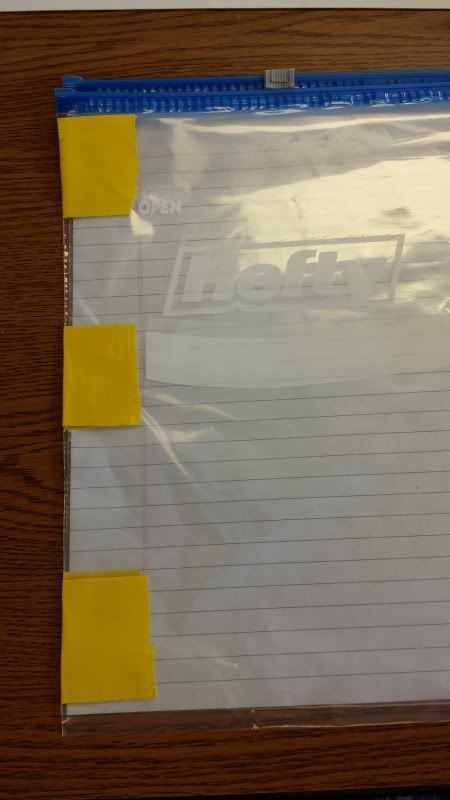
The final thing that I put into these binders is a gallon sized ziploc baggie that has been reinforced with duct tape and hole punched.


The students will keep homework papers, unfinished work, and works in progress in these packets. They could also slip in a book to read so that important materials won't get lost in between school and home. Now everything is in a neat package that fits inside their desks. They will also pick up some responsibility skills by making sure that this binder goes home every night and returns every morning.

I'm looking forward to this little bit of organization this year.

Sunday, July 28, 2013

Mentor Text - Social Studies


Those two FAB ladies over at Collaboration Cuties Stacia and Amanda are at it again with their latest installment of mentor texts.

This week's theme is Social Studies! They offered up a great text to include in the study of Native American tribes which fourth grade does every year. I definitely added that to my Amazon cart. Oh, definitely go over and grab the freebie. It's too awesome when you are starting up interactive notebooks. It will help students get ready for working with longer texts more independently.

For my installment, I want to share a book I was introduced to least year during our study of the American Revolution. It's called The Scarlet Stocking Spy by Trinka Noble. It's an incredibly moving tale of a young girl who helps craft a code with her soldier brother to pass information around about British ships in the harbor.


Here's Amazon's write up:
Philadelphia 1777 is no place for the faint of heart. The rumble of war with the British grows louder each day, and spies for and against the Patriots are everywhere. No one is above suspicion. Still, everyday life must go on and young Maddy Rose must help her mother, especially since her father's death at the Battle of Princeton and now with her beloved brother Jonathan off with Washington's army. But when childhood games become life-and-death actions, Maddy Rose is drawn ever deeper into events that will explode beyond her imagining. As young America stands on the very brink of its fight for freedom, it becomes clear that even the smallest of citizens can play the largest of parts, and that the role of a patriot has nothing to do with age and everything to do with heart. In The Scarlet Stockings Spy, Trinka Hakes Noble melds a suspenseful tale of devotion, sacrifice, and patriotism with the stark realities of our country's birth.Noted picture book author and illustrator Trinka Hakes Noble has pursued the study of children's book writing and illustrating in New York City at Parsons School of Design, the New School University, Caldecott medalist Uri Shulevitz's Greenwich Village Workshop, and New York University. She has authored and illustrated numerous books including the popular Jimmy's Boa series, which has been translated into six languages. Trinka lives in Berrnardsville, New Jersey. The Scarlet Stockings Spy is her first book with Sleeping Bear Press. Because Robert Papp's childhood drawings of his favorite superheros were such a pleasure, it was only natural that he would wind up an illustrator. Nowadays, his award-winning artwork appears on book covers and in magazines instead of on the refrigerator. He has produced hundreds of cover illustrations for major publishers across the United States. Robert lives in historic Bucks County, Pennsylvania.

I must give you full warning to be prepared for the ending. I wasn't expecting it and was shocked into stopping for a bit to catch my wits.  Just make sure that you read it through for yourself first.


Saturday, July 27, 2013

Student Motivators - Traffic cones

Joanne over at Head over Heels puts on this great linky party about motivating your students. She's got a great idea about how to engage students in complementing each other!

This fits in so perfectly with my theme for this year. I want them to pay more attention to what others are doing. This skill is going to help build that Common Core ideal of deeper thinking. Conversations are going to be different in my room this year as well. Instead of everyone just shouting out their connections to a book or a topic, they are going to practice listening to others and responding to their thoughts as well as incorporating their own.

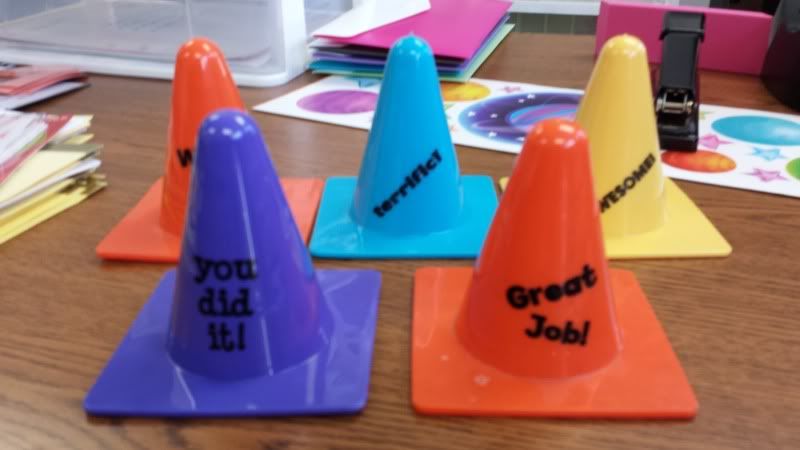
So for my student motivating idea to share, I have my student of the week be in charge of putting out these fun traffic cones with encouraging phrases on them. I get them at the Dollar Store.  As we are working on a lesson I might tap the student of the week to search for someone showing off exemplary skills and they would place the cone on that person's desk. The cones are turned in later for reward points. They like the attention and I get to reward those that are doing good more.

Yay!


Friday, July 26, 2013

Friday Fun - Last Summer Weekend Sale and Giveaways!


OoooOoooOhhh, it's here. The last Friday of Summer vacation. I saw this coming a long time ago, but was hoping it would get lost.

It didn't.

School begins for teachers next Wednesday. Even though we won't get paid for it, most of the staff will probably be in their rooms sometime on Monday and Tuesday as well. I know I will. I've got to put my huge beginning of the year pile together to send to the printer. Can't wait!

Since it's the last weekend right before my 23 year of teaching, I thought what other time than now to have my first sale in my TpT Store. So, rush right over there and grab all the things off of your wish list because the 20% Sale (they wouldn't let me type in 23) will end on Sunday, July 28th at midnight!!

 Now for an even better idea. How about winning some of those things on your wish list for FREE?

I've put together a little Giveaway to make up for the last 3% I couldn't tag onto my sale. This means there will be three prizes given away next Friday. Go ahead and enter as many times as you can below. Can't wait to see who the lucky winners are going to be for:


a Rafflecopter giveaway


The Winners are:
 

Thursday, July 25, 2013

First Teacher Casualty!

I've been slowly working through my room to get everything ready for ...wait for it...next week! My other friends (a.k.a. colleagues) have been making appearances as well. It's great to see them again that I'm almost excited about going back to school.

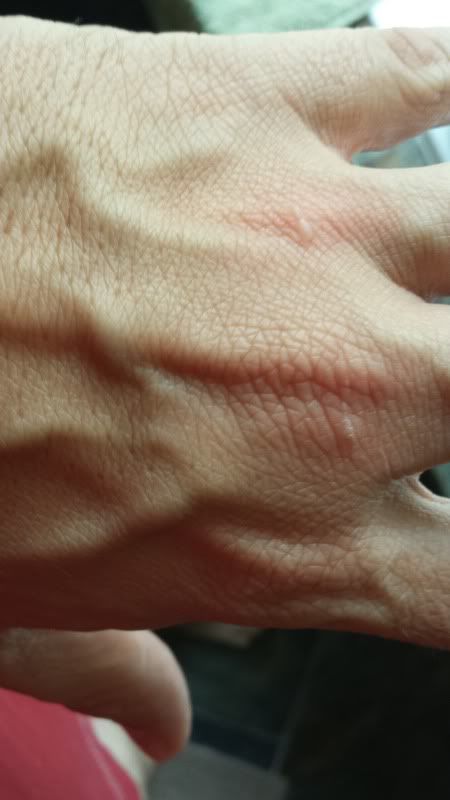
I was in there today getting my binders ready and putting a bunch of stuff up on the walls. I think I got a little too excited as I was using the hot glue.


So, as you gear up for 'Back to School' mode, I am warning you to remember to be careful as you wield your hot gun. Those suckers are hot.

Thursday Tutorial - Prezi

***HUGE DISCLAIMER: Prezi requires that your cell phone or tablet has Flash Player capabilities. Which apparently Android does NOT!! These presentations only work on iPhones and their tablets. Ug!


I often do things backwards. Like today's blog post, I am going back to the beginning of the Prezi tips and tutorials to find out how to set up an online presentation. This is after I struggled through creating my own for last week's QR code tutorial.

Prezi works off the same principals as Powerpoint. If you aren't familiar with that program, it is basically a slideshow that you can create that will run automatically through each slide or the viewer can click through using their keypad. You create each slide individually and add movements and even sounds and voice recordings if you like. Prezi is just a way to share it online.

What's really cool is that Prezi allows you to work simultaneously with others on the same slideshow. Think of the applications this could have for college students!

Once you sign in, there are actually tons of helpful videos that you can watch that help you get started on your presentation. There are a ton of 'metaphor' templates for you to choose from. Think about the information you are providing and then look over the templates to find one that matches it. Maybe your new blog creation was similar to climbing a mountain (I almost used the word 'like' in there. Big no no for metaphors). Choose your template and click on the slides over to the left to change the formatted information on each of the slides to match your own messages.


You can click anywhere on the original slide to add text and even place a youTube video using the controls at the top of the screen where it says 'insert.' Or you could bring over presentations you spent weeks creating in Powerpoint right into Prezi. Pretty cool.

You can add text boxes and remove others. You can change up the order of slides and make it your own. Moving the frames around on the template is as easy as clicking and holding then pulling it to where you want it to be. Adding images and new frames is done through the controls at the top under 'Frames and Arrows' and 'Insert' where you can maneuver through your files to find images you might have saved there.

Once you are ready to share with others, click on the 'Present Online' option and copy that link to give to others. I made the mistake of copying the URL from the 'Share' feature and it wouldn't let people in to see the slideshow. So both of my QR codes had to be redone. Bummer.

But it seems I wasn't too far off the mark for creating my own Prezi online presentation. I guess it was more self-explanatory than I thought. My biggest problem was that I couldn't figure out how to get down to each individual slide to add information. I kept clicking on the original slide, but it wouldn't come up. Then I realized I had to click on the separate slides over to the left to change the information.

I still have a few questions though.
*How can I copy and paste an entire frame?
*How do I make sure that the text, such as subtitle, are exactly the same size. They only had the bigger and smaller keys and you can pull out the frames to enlarge the text size, but who knows if you pull out every text size to the same?


If you are interested in joining Prezi, use this Referral Link and tell them ScrappyGuy sent ya!

Wednesday, July 24, 2013

Wednesday Writings - Travel Travails

I am finally home after the weirdest air travel vacation I've ever taken. I'm still trying to get over it all after losing almost two days to it, so I'm turning today's post into a bit of a vent. Bear with me.

It started right from the beginning of the trip. Last Wednesday, I was supposed to board a plane headed to Laguardia and catch a connection to Bangor, Maine then drive another four hours to the most northern city in the contiguous US. Sounds simple right? Mmm-hmm. No.

Driving into the airport you could see a huge black cloud with swirly edges just sitting right over the airport. Lovely. We bit our fingernails until they announced our boarding, hoping we'd get out tonight since we had reservations and such in all the other cities. They let us on the plane after delaying it almost an hour and a half. Then we proceed to sit at the gate for another two hours just waiting for the little storm to pass. It doesn't. Just when I should just take a nap, they come back on the intercom to apologize. Since we've been sitting so long, the pilots had timed out for the day and we would need to deplane for them to decide what to do next.

OY!

We've already missed our Bangor connection (which we discover was cancelled anyway), so we decide to just drive back home and try again in the morning. We rebook everything and eat the $100+ price of the hotel in Bangor for the bright and shiny time of 6 A.M. The alarm should never have to go off at 3:45 in the morning for anything. It was insane.

Without storms to impede us we made it to Bangor without a hitch, got our car and drove to the prettiest spot in Northern Maine to spend a wonderful five days celebrating my sister's reception. It truly was great getting to hang out with my two sisters and various family members for that time. We are all so spread out, it's hard to get us all in one place. My two brothers couldn't make it this time, bit sad about that.

Now that we shared some memories and were ready to head back to reality we drive back to Bangor to sneak a peak at Stephen King's house and drop off the rental car.


Now we're sitting in the tiniest airport I've ever been in,  including Key West, watching them push our departure time further back and back. Apparently there's weather in Laguardia and Atlanta...again. We were at the desk asking about changing flights, but the gal recommended we wait it out as our best option. Just when we think they are getting ready to announce our flight, we see on the CNN channel next to the gate that a plane has just crashed landed without nose gear at Laguardia. Really? Thankfully, no one was hurt.

But our flight was cancelled.

It was 9 P.M. by this time. We thought of just getting in a car and driving to a bigger airport such as Portland or Boston that would have a direct flight to Atlanta. But none of the rental places had any cars. We ended up staying at the hotel we originally supposed to stay at last week. The  next day wasn't being nice either. They were already delaying the 6 A.M. flights from Bangor another four hours. Our flight wasn't until 4. Had breakfast at a HoJo's and then called an offsite rental company to see if they had any cars we could drive one way. Enterprise came through and quoted us a price of $85. We showed up and they realized their mistake of not including the quote for a one way drop off. We got the car for the cheaper day rate. Woot! Score one for positive.

Then we proceed to drive through the biggest storm through the rest of Maine and into New Hampshire. Rain coming down in sheets and battering our little tin can. As we pull into Boston blue skies are back and the sun makes an appearance. We think the worst is over. Sigh. It isn't. That storm followed us down. And now it's sitting right over the airport.

As we watch the storm come through and slowly, ever so slowly, work its way overhead something happens to our plane coming in. The control tower makes them circle above the airport until the thunderstorms have passed. Well, they circle so long they run out of fuel. Lovely! The gate attendant comes on the intercom to announce this saying the plane has been rerouted to Manchester to refuel and then it would be back to pick us up for Atlanta.

Okay, that sounds like it will take a while, so we head to Legal Seafood's Test Kitchen for a much needed lobster roll. Watching the flight announcements on our phone, we notice that the departure time isn't changing. It's still set for 6:15 which is five minutes away. I leave the table to check with one of the attendants and she confirms that the plane is now at the gate and must have been let in instead of going to Manchester. OH BLEEPITY!

The waiter kindly throws all of our stuff in a bag and we race back to the gate on the other side of the terminal where they are boarding our flight. Geesh! We almost missed this thing.

Finally we are in the air and being pampered. Did I mention they upgraded us to first class because of all our troubles? It was nice, with linens and warm hand towels. Too bad we can't do this on our trip to Australia. Home never looked so good after this trip.


Monday, July 22, 2013

Maine is trying to keep me

I jetted I'd for my sister's reception in Maine.  Now trying to get home but stuck in Bangor due to weather.  This means the Monday post may not happen!  Keep your fingers crossed for me.

Friday, July 19, 2013

Friday Fun - 3-5 Product Swap


Lisa at 2GradeStories is doing a product swap for K-2. I was a bit sad that I couldn't join in. It sounds super fun. Then I thought to myself, "Well, why can't I host one for 3-5?" And the idea was born.

A Product Swap is when people sign up to share products with each other from their TpT stores. Whoever you are matched with swaps a product of your choice from their store and vice versa. Then you write a blog post detailing lessons you might have to use this in your classroom. Think Back to School ideas!

Sound fun?

If you would like to join up, just fill out this Google Docs form by next Friday and I will contact you with your Swap Partner.


Thanks for joining!

Congratulations! Library Tags

And the drumroll begins in the background....

Congratulations goes out to...LESLIE HATHCOAT!!

I will be creating your very own set of library tags done in a royal blue and white design. Be on the lookout for that prize sometime early next week!

Thanks for all those who entered.

Thursday, July 18, 2013

Thursday Tutorial - QR codes 2

As promised, I am back with my completed parent letter to hand out during registration. Which, by the way, will occur in exactly 2 weeks, 3 days, and 22 hours (sigh). Using QR codes seems to be the easy part. The hardest thing about the process seemed to be where to store the information that I wanted parents to be pointed at when they read the QR code.

I did up some presentations using Prezi which was not self explanatory. I fumbled around a bit in there without watching any of their suggested tutorial videos or tips and tricks. Maybe I should have started there, eh? Anyway, be on the lookout for a Thursday Tut about this online tool. By the end I had two slideshows that parents could go through to discover a little bit more information about me and things that will occur in Fourth Grade this year. One was just information based, the other was how to create their own binder covers.

I bought 2" binders for my students to put all of their work in this year. I simply despise spiral bound notebooks and how messy they become so fast. I hate those metal spires that poke out every which way. And I simply detest trying to wrangle a stuck pencil out from the spine while trying to teach. Ugh! Last year I tried using a 1" binder, but found that we were constantly removing information such as Social Studies units from there to put somewhere else. There simply wasn't enough room. Hopefully the 2" binder will save us the trouble of doing that.

Here are the two QR codes I created using QR Stuff and you can try them out for me to see if there are any bugs before I present them to parents. (Thanks for the help!)


I am also including the editable parent letter I am handing out during our school's registration. Feel free to grab that and make it your own.

Parent Letter with QR codes


There you have it. QR codes made simple. I had an update from Ideas by Jivey that it doesn't look as if our school will be receiving any class sets of tablets with camera and internet access soon. But I'm hoping that enough parents have a smartphone with data plans that we can make use of this fun resource!

Let me know if you have any questions and I will try to figure them out. See you soon.


Wednesday, July 17, 2013

Writing Wednesday - FANBOYS

Howdy,

I managed to grab a copy of my work files to start filtering through as the last two weeks of summer winds down. Must be prepared before the kiddos arrive. One of the things in Writing I definitely want to start right away is introducing my class to COORDINATING CONJUNCTIONS. I admit, I had to go look this up last year so I understood what they were.

Coordinating Conjunctions are small words that coordinate two separate sentences into one whole. In this sentence below you can see the main clause, + Coordinating Conjunction, main clause.

"I hate to waste a single second of summer, for it is precious and fleeting."

FANBOYS is a mnemonic device to help your students remember the different words that act as coordinating conjunctions. Each of the letters stands for one of the seven words that act as coordinating conjunctions. Here, read it this way

F - for
A - and
N - nor
B - but
O - or
Y - yet
S - so

While sitting on the couch watching Monster House (see yesterday's post) I created this little poster to put up in my classroom.


Please excuse my drawing skills. You can grab it for free here: FANBOYS Poster

Complex and compound sentences are hard enough to understand, so simple things like this will make understanding a little easier for students.

Hope  you can use it!

Tuesday, July 16, 2013

Tried It Tuesday - Sharknado!

I have a confession to make. I am a GOOBER for bad horror movies. That's why the SyFy Channel is listed as one of my favorite fast buttons at home. My family has this tradition when we get together. Everyone picks a bad horror movie to share and who ever brings the WORST wins the title "King/Queen of the Flop", until the next time that is.

SyFy has such eclectic tastes in its programming that it is never lacking in suggestions for me to bring.

This past week was no exception. Have you heard about their latest installment to sit on the shelves next to Mega Piranha and Triassic Attack? It's called SHARKNADO. Uh-huh. It really is. The premise is that a freak storm in LA pulls literally millions of sharks closer to the city where a water spout lifts them up into the air to create all sorts of havoc.


Oh, it was glorious in its cheese factor. Hilarious moments included quotes such as "I think we gonna need a bigger chopper" and one shark landing right on top of the exact car containing our illustrious heroes. Which leads me to the next factoid. The main characters are a definite dredging of the D List. Ian Ziering (from the original 90210) and Tara Reid (who is a whole other sort of hot mess) as a typical arguing couple who are separated at the moment. 


I hope I don't give anything away, but you can imagine the impression Ms. Reid gets while watching her husband battle a rainstorm of sharks with a chainsaw. By the end the couple is working towards settling their differences. Divorce lawyers take note! Throw a bunch of sharks at your client to see what they are made of.

I am sitting here giggling over how bad this movie was. I'm staging a viewing of it at my house today at 2 P.M. to get ready to bring it to my sister's house in Maine when we travel up there tomorrow. Hopefully our plane will be skirting any waterspouts full of sharks.

Oh, and just wait until you see the ending. It was truly spectacular, right down to the last cut. Ian is my hero.


As if I haven't interested you enough already, here's the trailer for the show that is due to repeat this Thursday night. Set your DVR!

Be WARNED, this video has been deemed to violent for TV.


Monday, July 15, 2013

Mentor Monday - Rafflecopter

Not sure if you noticed but I added a new piece to my blog. Last Friday I posted a contest to win a free set of library tags for your classroom in a customized color choice. If you haven't entered yet, you still have until this Friday to sign up here: Library Tag Contest

I'm using Rafflecopter to set it all up. It's a free service that allows you to post contest entries to your blog posts. I think it's great because they offer you  many means to conducting your contest. When you sign in and start a new plan, you see this page:

You name your contest, provide details to your prize, and add some options as seen below


Love the 'Invent your Own Option' idea where you can ask your followers to link back to your TpT store, or have them link their blog back to your original post. I'm sure you can come up with some other things to add to this button as well.

If you are thinking of having a Giveaway on your blog I would definitely recommend you check out Rafflecopter!


Sunday, July 14, 2013

Math Literature Linky


Amanda and Stacia at Collaboration Cuties are doing their math literature linky party, so I thought I would bring this post back today. Go see them to link up your favorite math book idea.


One of the books our Math Coach uses in her series of Math Literature was the Greedy Triangle by Marilyn Burns.


It's a tale of a Triangle that whiles its day away being half of a sandwich, or sailing on a boat, or eavesdropping on people's conversations as the shape their elbows make against their body. The triangle becomes jaded with this lifestyle and wants something more. After asking for several transformations, the triangle realizes that her/his life isn't all that bad.


After you read this book to your students, you can pass out the following sheet for them to fill out on their own. (It's available here The Greedy Triangle Write Up)

 The students get to choose one of the shapes the Triangle goes through and apply it to shapes that they've seen around them. Encourage them to think of some really unique uses for their shape, like the shape made by people bending their elbows! This lesson will get them thinking about how the author gave several creative ways that geometric shapes can be found in the world around us. Their unique minds will think outside the box and show you some insight into their personalities. Just be prepared.

I would love a comment on the download at TpT on how you might be using this little idea for your classroom.